
This post originally appeared on the Decodable blog. All rights reserved.
Postgres read replicas are commonly used not only to distribute query load amongst multiple nodes, but also to ensure high availability (HA) of the database. If the primary node of a Postgres cluster fails, a read replica can be promoted to be the new primary, processing write (and read) requests from thereon.
Prior to Postgres version 16, read replicas (or stand-by servers) couldn’t be used at all for logical replication. Logical replication is a method for replicating data from a Postgres publisher to subscribers. These subscribers can be other Postgres instances, as well as non-Postgres tools, such as Debezium, which use logical replication for change data capture (CDC). Logical replication slots—which keep track of how far a specific subscriber has consumed the database’s change event stream—could only be created on the primary node of a Postgres cluster. This meant that after a failover from primary to replica you’d have to create a new replication slot and typically also start with a new initial snapshot of the data. Otherwise you might have missed change events occurring after reading from the slot on the old primary and before creating the slot on the new primary.
Whilst external tools such as pg_failover_slots were added over time, a built-in solution for failing over replication slots from one Postgres node to another was sorely missed by many users. This situation substantially improved with the release of Postgres 16, which brought support for setting up replication slots on read replicas. I’ve discussed this feature in great detail in this post. Back then, I also explored how to use replication slots on replicas for manually implementing replication slot failover. But the good news is, as of Postgres version 17, all this is not needed any longer, as it finally supports failover slots out of the box!
Failover slots are replication slots which are created on the primary node and which are propagated automatically to read replicas. Their state on the replica is kept in sync with the upstream slot on the primary, which means that after a failover, when promoting a replica to primary, you can continue to consume the slot on the new primary without the risk of missing any change events. This is really great news for using tools like Debezium (and by extension, data platforms such as Decodable, which provides a fully-managed Postgres CDC connector based on Debezium) in HA scenarios, so let’s take a closer look at how this works.
Hello, Failover Slots!
Let’s start by exploring failover slots solely from the perspective of using Postgres' SQL interface to logical replication. If you want to follow along, check out this project from the Decodable examples repository. It contains a Docker Compose file which brings up a Postgres primary and a read replica (based on this set-up by Peter Eremeykin, which makes it really easy to spin up an ephemeral Postgres cluster for testing purposes), as well as a few other components which we’ll use later on. Start everything by running:
1
$ docker compose up
Primary and replica are synchronized via a physical replication slot (i.e. unlike with logical replication, all the WAL segments are replicated), ensuring that all data changes done on the primary are replicated to the replica immediately. Get a session on the primary (I’m going to use pgcli which is my favorite Postgres CLI client, but psql will do the trick as well):
1
$ pgcli --prompt "\u@primary:\d> " "postgresql://user:top-secret@localhost:5432/inventorydb"
The prompt has been adjusted to show the current instance. To verify you are on the primary and not the replica run the following:
1
2
3
4
5
6
user@primary:inventorydb> SELECT * from pg_is_in_recovery();
+-------------------+
| pg_is_in_recovery |
|-------------------|
| False             |
+-------------------+
Both primary and replica are already configured with WAL level logical, as required for logical replication:
1
2
3
4
5
6
user@primary:inventorydb> SHOW wal_level;
+-----------+
| wal_level |
|-----------|
| logical   |
+-----------+
Note that if you are running Postgres on Amazon RDS (where version 17 is available in the preview environment right now), you’ll need to set the parameter rds.logical_replication to on for this.
There’s a physical replication slot for synchronizing changes from the primary to the replica server:
 1
 2
 3
 4
 5
 6
 7
 8
 9
10
11
12
13
14
15
16
17
18
19
user@primary:inventorydb> WITH node_status AS (
       SELECT
         CASE WHEN pg_is_in_recovery() = 'True' Then 'stand-by' ELSE 'primary' END AS role
      )
      SELECT
        node_status.role AS node,
        slot_name,
        slot_type,
        active,
        plugin,
        database, failover, synced,
        confirmed_flush_lsn
      FROM
        pg_replication_slots, node_status;
+---------+------------------+-----------+--------+--------+----------+----------+--------+---------------------+
| node    | slot_name        | slot_type | active | plugin | database | failover | synced | confirmed_flush_lsn |
|---------+------------------+-----------+--------+--------+----------+----------+--------+---------------------|
| primary | replication_slot | physical  | True   |  |    | False    | False  |               |
+---------+------------------+-----------+--------+--------+----------+----------+--------+---------------------+
This slot must be added to the set of synchronized stand-by slots using the synchronized_standby_slots configuration option:
1
2
user@primary:inventorydb> ALTER SYSTEM SET synchronized_standby_slots='replication_slot';
user@primary:inventorydb> SELECT pg_reload_conf();
This setting, new in Postgres 17, makes sure that any logical replication slots we are going to set up in the following cannot advance beyond the confirmed log sequence number (LSN) of this physical slot. Without that setting, logical replication consumers such as Debezium may receive changes which never got propagated to the replica in case of a failure of the primary, resulting in an inconsistent state.
Next, get a database session on the replica:
1
$ pgcli --prompt "\u@replica:\d> " "postgresql://user:top-secret@localhost:5433/inventorydb"
As above, verify that you are on the right node indeed:
1
2
3
4
5
6
user@primary:inventorydb> SELECT * from pg_is_in_recovery();
+-------------------+
| pg_is_in_recovery |
|-------------------|
| True              |
+-------------------+
It is already configured with hot_standby_feedback=ON which is a requirement for failover slots to work.
In addition, the database name must be added to primary_conninfo on the replica (its connection string for connecting to the primary).
I couldn’t find a way for just adding a single attribute, so I retrieved the current value and added the database name, so that the complete string can be written back (on RDS, that setting can’t be changed, instead set the rds.logical_slot_sync_dbname parameter to the name of the database):
1
2
3
user@replica:inventorydb> ALTER SYSTEM SET primary_conninfo = 'user=replicator password=''zufsob-kuvtum-bImxa6'' channel_binding=prefer host=postgres_primary port=5432 sslmode=prefer sslnegotiation=postgres sslcompression=0 sslcertmode=allow sslsni=1 ssl_min_protocol_version=TLSv1.2 gssencmode=prefer krbsrvname=postgres gssdelegation=0 target_session_attrs=any load_balance_hosts=disable dbname=inventorydb';

user@replica:inventorydb> SELECT pg_reload_conf();
At this point, primary and replica are set up for failover slots to work. So let’s create a logical replication slot on the primary next:
1
2
3
4
5
6
user@primary:inventorydb> SELECT * FROM pg_create_logical_replication_slot('test_slot', 'test_decoding', false, false, true);
+-----------+-----------+
| slot_name | lsn       |
|-----------+-----------|
| test_slot | 0/304DCA0 |
+-----------+-----------+
As of Postgres 17, there’s a new optional parameter of the pg_create_logical_replication_slot() function for specifying that a failover slot should be created (failover=true).
On the replica, call pg_sync_replication_slots() for synchronizing all failover slots from the primary:
1
2
3
4
5
6
user@replica:inventorydb> SELECT pg_sync_replication_slots();
+---------------------------+
| pg_sync_replication_slots |
|---------------------------|
|                           |
+---------------------------+
This will make sure that the slots on both primary and replica are at exactly the same LSN. To verify that this is the case, query the status of the slot on both nodes, using the same query as above:
 1
 2
 3
 4
 5
 6
 7
 8
 9
10
11
12
13
14
WITH node_status AS (
  SELECT
    CASE WHEN pg_is_in_recovery() = 'True' Then 'stand-by' ELSE 'primary' END AS role
)
SELECT
  node_status.role AS node,
  slot_name,
  slot_type,
  active,
  plugin,
  database, failover, synced,
  confirmed_flush_lsn
FROM
  pg_replication_slots, node_status;
Right now, the confirmed_flush_lsn of the slot on the replica matches that of the slot on the primary, i.e.
the two slots are in sync.
But once a client consumes changes from the primary slot, the slot on the replica will not be updated accordingly.
You could manually call pg_sync_replication_slots() repeatedly to synchronize the slot on the replica, but luckily, there’s an easier way.
By setting sync_replication_slots to on on the replica, a synchronization worker will be started, which will propagate the replication state automatically:
1
2
user@replica:inventorydb> ALTER SYSTEM SET sync_replication_slots = true;
user@replica:inventorydb> SELECT pg_reload_conf();
Now do some data changes in the primary and consume them from the replication slot:
 1
 2
 3
 4
 5
 6
 7
 8
 9
10
11
12
13
14
15
user@primary:inventorydb> UPDATE inventory.customers SET first_name='Sarah' where id = 1001;

user@primary:inventorydb> UPDATE inventory.customers SET first_name='Sam' where id = 1001;

user@primary:inventorydb> SELECT * FROM pg_logical_slot_get_changes('test_slot', NULL, NULL);
+-----------+-----+------------------------------------------------------------------------------------------------------------------------------------------------------------------------------------------------------------------------------------------------------------------------------------------------------------------------------------------------------------------------------------------------------------------+
| lsn       | xid | data                                                                                                                                                                                                                                                                                                                                                                                                             |
|-----------+-----+------------------------------------------------------------------------------------------------------------------------------------------------------------------------------------------------------------------------------------------------------------------------------------------------------------------------------------------------------------------------------------------------------------------|
| 0/304DCD8 | 752 | BEGIN 752                                                                                                                                                                                                                                                                                                                                                                                                        |
| 0/304DCD8 | 752 | table inventory.customers: UPDATE: old-key: id[integer]:1001 first_name[character varying]:'Sally' last_name[character varying]:'Thomas' email[character varying]:'sally.thomas@acme.com' is_test_account[boolean]:false new-tuple: id[integer]:1001 first_name[character varying]:'Sarah' last_name[character varying]:'Thomas' email[character varying]:'sally.thomas@acme.com' is_test_account[boolean]:false |
| 0/304DFE8 | 752 | COMMIT 752                                                                                                                                                                                                                                                                                                                                                                                                       |
| 0/304E038 | 753 | BEGIN 753                                                                                                                                                                                                                                                                                                                                                                                                        |
| 0/304E038 | 753 | table inventory.customers: UPDATE: old-key: id[integer]:1001 first_name[character varying]:'Sarah' last_name[character varying]:'Thomas' email[character varying]:'sally.thomas@acme.com' is_test_account[boolean]:false new-tuple: id[integer]:1001 first_name[character varying]:'Sam' last_name[character varying]:'Thomas' email[character varying]:'sally.thomas@acme.com' is_test_account[boolean]:false   |
| 0/304E100 | 753 | COMMIT 753                                                                                                                                                                                                                                                                                                                                                                                                       |
+-----------+-----+------------------------------------------------------------------------------------------------------------------------------------------------------------------------------------------------------------------------------------------------------------------------------------------------------------------------------------------------------------------------------------------------------------------+
If you query pg_replication_slots once more, you’ll see that the confirmed flush LSN of the slot on the replica matches still that of the primary.
To conclude our basic experiments, let’s see what happens when we try to consume the replication slot on the replica server:
1
2
3
4
user@replica:inventorydb> SELECT * FROM pg_logical_slot_get_changes('test_slot', NULL, NULL);
cannot use replication slot "test_slot" for logical decoding
DETAIL:  This replication slot is being synchronized from the primary server.
HINT:  Specify another replication slot.
Somewhat to be expected, this triggers an error: as the state of failover slots on a replica is driven by the corresponding slot on the primary, they cannot be consumed. Only after promoting a replica to the primary, clients can connect to that slot and read change events from it. Let’s give this a try by setting up an instance of the Decodable Postgres CDC connector next!
Failover Slots in Decodable
Decodable is a fully managed realtime data platform based on Apache Flink. It offers managed connectors for a wide range of source and sink systems, allowing you to build robust and efficient ETL pipelines with ease. Its Postgres CDC connector is using Debezium under the hood, which in turn uses logical replication for ingesting data change events from Postgres. Thanks to failover slots, it’s possible to continue streaming changes from a Postgres read replica which got promoted to primary into Decodable, without missing any events.
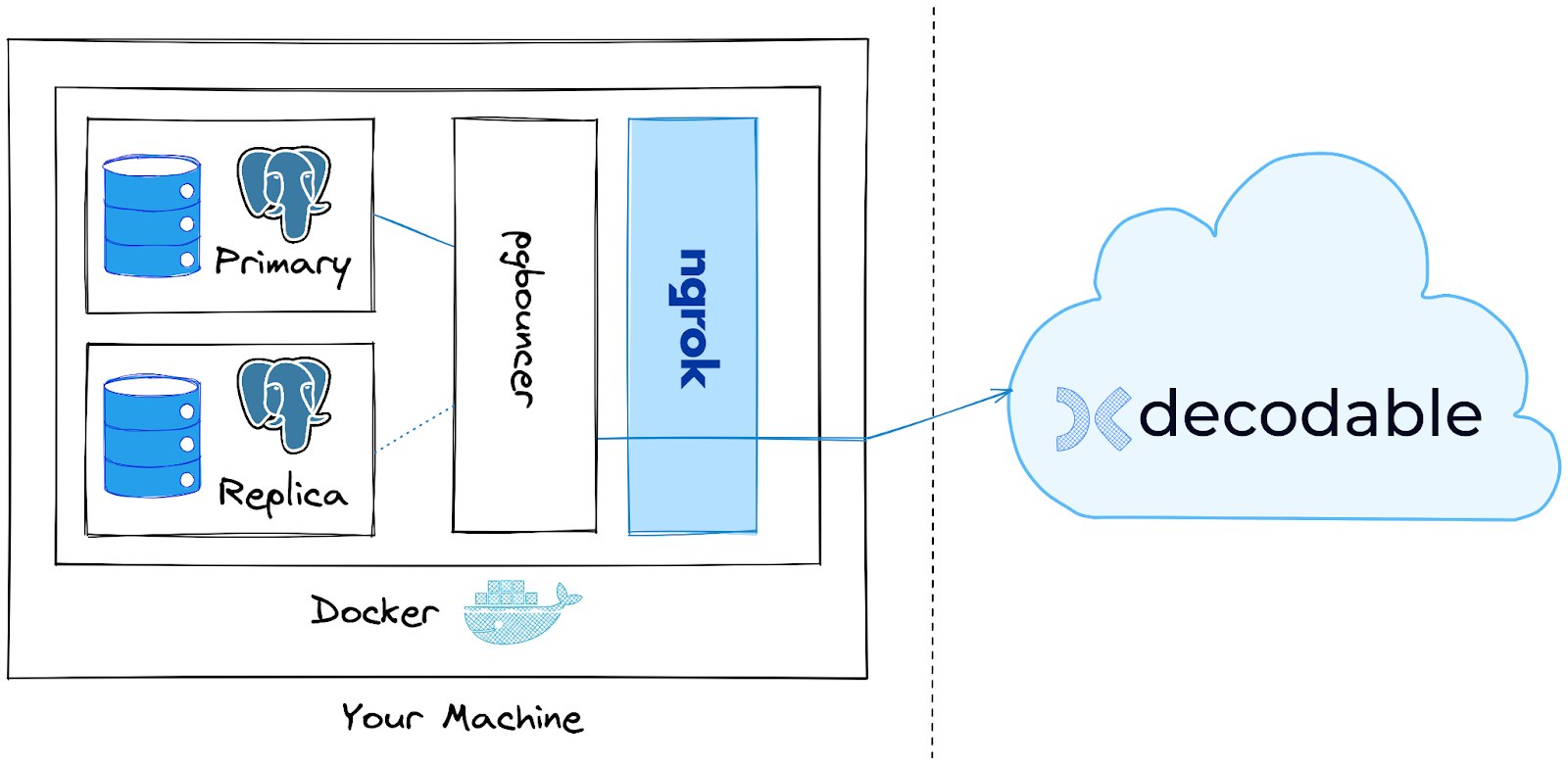
For this kind of use case it makes sense to put a Postgres proxy in front of the database cluster, exposing one stable endpoint for it. This will enable us later on to fail over from primary to replica without having to reconfigure the Decodable Postgres connector. In a production scenario, this approach will make the fail-over an implementation detail managed by the team owning the database, not requiring coordination with the team running the data platform. The Docker Compose set-up from above contains the pgbouncer proxy for this purpose.
In order to access the database on your machine from Decodable which is running in the cloud, we are going to use ngrok, an API gateway service. Amongst other things, ngrok lets you expose non-public resources to the cloud, i.e. exactly what we need for this example. You may consider this approach also for connecting to an on-prem database in a production use case.
The overall architecture looks like this:
For the following steps, you’ll need to have these things:
-
A free Decodable account
-
The Decodable CLI installed on your machine
-
A free ngrok account
The pgbouncer proxy is configured to connect to the primary Postgres host, and ngrok exposes a publicly accessible tunnel for connecting to pgbouncer.
Decodable provides support for declaring your resources—connectors, SQL pipelines, etc.—in a declarative way. You describe the resources you’d like to have in a YAML file, and the Decodable platform will take care of materializing them in your account. The example project contains definitions for a Postgres CDC source connector, a Decodable secret with the database password to be used by the connector, and a stream, to which the connector will write its data:
 1
 2
 3
 4
 5
 6
 7
 8
 9
10
11
12
13
14
15
16
17
18
19
20
21
22
23
24
25
26
27
28
29
30
31
32
33
34
35
36
37
38
39
40
41
42
43
44
45
46
47
48
49
50
51
52
53
54
55
56
57
58
59
60
61
62
63
64
65
66
---
kind: secret
metadata:
   name: inventorydb-password
   tags:
       context: failover-slots-demo
spec_version: v1
spec:
   value_literal: "top-secret"
---
kind: connection
metadata:
   name: inventorydb-source
   tags:
       context: failover-slots-demo
spec_version: v2
spec:
   connector: postgres-cdc
   type: source
   stream_mappings:
       - stream_name: inventorydb__inventory__customers
         external_resource_specifier:
           database-name: inventorydb
           schema-name: inventory
           table-name: customers
   properties:
       hostname: "%DB_HOST%"
       password: inventorydb-password
       port: "%DB_PORT%"
       database-name: inventorydb
       decoding.plugin.name: pgoutput
       username: user
---
kind: stream
metadata:
   name: inventorydb__inventory__customers
   description: Automatically created stream for inventorydb.inventory.customers
   tags:
       context: failover-slots-demo
spec_version: v1
spec:
   schema_v2:
       fields:
           - kind: physical
             name: id
             type: INT NOT NULL
           - kind: physical
             name: first_name
             type: VARCHAR(255)
           - kind: physical
             name: last_name
             type: VARCHAR(255)
           - kind: physical
             name: email
             type: VARCHAR(255)
           - kind: physical
             name: is_test_account
             type: BOOLEAN
       constraints:
           primary_key:
               - id
   type: CHANGE
   properties:
       partition.count: "2"
       compaction.enable: "false"
       properties.compression.type: zstd
ngrok creates a tunnel for publicly exposing the local Postgres instance using a random host name and port. With the help of httpie and jq, we can retrieve the public endpoint of the tunnel from the local ngrok REST API (alternatively, there’s also a UI running on http://localhost:4040/), allowing us to propagate these values to the resource definition via sed before applying the same using the Decodable CLI ( the special file name - indicates to read from stdin rather from a given file):
 1
 2
 3
 4
 5
 6
 7
 8
 9
10
11
12
13
14
15
16
17
18
19
20
21
$ sed -e s/%DB_HOST%/$(http localhost:4040/api/tunnels | jq -r '.tunnels[] | select(.name=="pgbouncer") | .public_url | sub("tcp://"; "") | sub(":.*"; "") ')/g \
-e s/%DB_PORT%/`http localhost:4040/api/tunnels | jq -r '.tunnels[] | select(.name=="pgbouncer") | .public_url | sub("tcp://"; "") | sub(".*:"; "") '`/g \
decodable-resources.yaml | \
decodable apply -

---
kind: secret
name: inventorydb-password
id: 8fc44565
result: created
---
kind: connection
name: inventorydb-source
id: "62943949"
result: created
---
kind: stream
name: inventorydb__inventory__customers
id: "92523911"
result: created
• Wrote plaintext values for secret IDs: [8fc44565]
At this point, all the resources have been created in your Decodable account, but the Postgres source connector is not running yet.
Before we can start it ("activate" in Decodable terminology), we need to create the replication slot in the database, configuring it as a failover slot.
For the Decodable Postgres CDC connector to pick up the slot, it must have the name decodable_<connection-id>.
To obtain the connection id, refer to the output of the decodable apply command above, or retrieve it using decodable query like so:
1
2
3
$ decodable query --name "inventorydb-source" --kind connection --keep-ids | yq .metadata.id

62943949
In the primary Postgres instance, create the replication slot, configuring it as a failover slot:
1
user@primary:inventorydb> SELECT * FROM pg_create_logical_replication_slot('decodable_', 'pgoutput', false, false, true);
Next, activate the connector:
1
2
3
4
5
6
7
8
$ decodable connection activate $(decodable query --name "inventorydb-source" --kind connection --keep-ids | yq .metadata.id)

inventorydb-source
  id                       62943949
  description              -
  connector                postgres-cdc
  type                     source
  ...
Upon its first activation, the connector will create an initial snapshot of the data in the customers table and then read any subsequent data changes incrementally via the replication slot we’ve created.
To take a look at the data head over to the Decodable web UI in your browser and go to the "Streams" view.
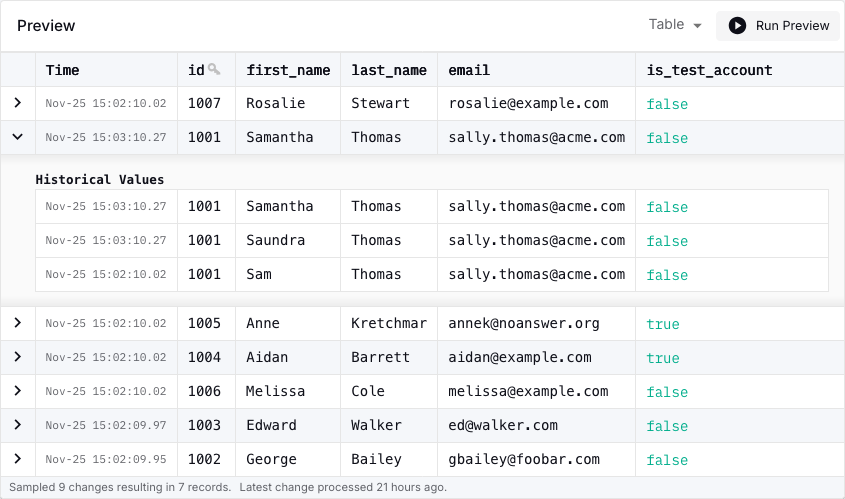
Select the inventorydbinventorycustomers stream and go to the "Preview" tab where you should see the data from the snapshot.
Do a few data changes in the Postgres session on the primary node:
1
2
user@primary:inventorydb> UPDATE inventory.customers SET first_name='Saundra' where id = 1001;
user@primary:inventorydb> UPDATE inventory.customers SET first_name='Samantha' where id = 1001;
Shortly thereafter, these updates will be reflected in the stream preview as well:
Now let’s simulate a failover from primary to replica server and see how the failover of the replication slot is handled. Stop the primary Postgres node:
1
$ docker compose stop postgres_primary
Go to the database session on the replica and promote it to the primary:
1
user@replica:inventorydb> select pg_promote();
At this point, pgbouncer still points to the previous, now defunct primary server. Change its configuration in the Docker Compose file so it forwards to the new primary:
 1
 2
 3
 4
 5
 6
 7
 8
 9
10
   pgbouncer:
     image: edoburu/pgbouncer:latest
     environment:
-      - DB_HOST=postgres_primary
+      - DB_HOST=postgres_replica
       - DB_PORT=5432
       - DB_USER=user
       - DB_PASSWORD=top-secret
       - ADMIN_USERS=postgres,admin
       - AUTH_TYPE=scram-sha-256
Stop and restart pgbouncer (other proxies such as pgcat are also be able to reload updated configuration on the fly):
1
2
$ docker compose stop pgbouncer
$ docker compose up -d
If you go back to the Decodable web UI and take a look at the inventorydb_source connection, it should be in the "Retrying" state at this point, as it lost the connection to the previous primary (via the proxy).
After a little while, it will be in "Running" state again, as the proxy now routes to the new primary server.
The connector now consumes from the replication slot on that new primary server, as you can confirm by doing a few more data changes on that node and examining the data in the Decodable stream preview also by verifying that the replication slot now is in Active state:
1
user@replica:inventorydb> INSERT INTO inventory.customers VALUES (default, 'Rudy', 'Replica', 'rudy@example.com', FALSE)
If you retrieve the state of the replication state again, using the same query as above, you’ll also see that it is marked as active now:
1
2
3
4
5
+----------+--------------------+-----------+--------+----------+-------------+----------+--------+---------------------+
| node     | slot_name          | slot_type | active | plugin   | database    | failover | synced | confirmed_flush_lsn |
|----------+--------------------+-----------+--------+----------+-------------+----------+--------+---------------------|
| stand-by | decodable_62943949 | logical   | False  | pgoutput | inventorydb | True     | True   | 0/304E2E0           |
+----------+--------------------+-----------+--------+----------+-------------+----------+--------+---------------------+
Wrapping Up
Failover slots are an essential part to using Postgres and logical replication in HA scenarios. Added in Postgres 17, they allow logical replication clients such as Debezium to seamlessly continue streaming change events after a database fail-over, ensuring no events are lost in the process. This renders previous solutions such as manually synchronizing slots on a standby server (as supported since Postgres 16) or external tools such as pg_failover_slots obsolete (although the latter still comes in handy if you are on an older Postgres version and can’t upgrade to 17 just yet).
To create a failover slot, the new failover parameter must be set to true when calling pg_create_logical_replication_slot().
Debezium does not do this yet at the moment, but I am planning to implement the required change in the next few weeks.
Keep an eye on DBZ-8412 to track the progress there.
In the meantime, you can create the replication slot manually, as described above.
To learn more about Postgres failover slots, check out the blog posts by Bertrand Drouvot and Amit Kapila.
RDS users should refer to the AWS documentation on managing failover slots.
If you’d like to give it a try yourself, including the managed Postgres CDC connector on Decodable, you can find the complete source code for this blog post in the Decodable examples repository on GitHub.